

On this page
Where does ChatGPT traffic show up in GA4?
In the AI Assistant channel of the default channel group. Google launched it on 13 May 2026 and there is nothing to set up. When a visit comes from an AI chat tool Google recognises, GA4 sets the medium to ai-assistant and the campaign to (ai-assistant), and files it under that channel.
To see it, go to Reports, Acquisition and Traffic acquisition. AI Assistant appears as one row in the table. Add session source as a secondary dimension to tell chatgpt.com from gemini.google.com and the rest. Add landing page to see where people arrive.
Google's help pages give ChatGPT, Gemini, Claude, DeepSeek, Copilot and Grok as examples, but Google does not publish the full list of tools it recognises. AI Overviews and Google's AI Mode are left out too. Those visits stay in organic search, because they come from Google.
How to build an AI channel group with a regex
A custom channel group lets you decide which sources count as AI. It is worth having for two reasons. You can add sources that may be missing from Google's list, such as Perplexity or Meta AI, and Google's help says custom groups can also be applied to past data.
Google's help offers a sample, but its regex starts with ^.*ai, a part that can also catch sources ending in ai that are not chat tools. The one in the list below only matches specific chat tools, and you can add new ones as they appear.
A standard property allows two custom groups on top of the default one, with up to 50 channels each. You need the Editor role or higher to create one. Order matters, because GA4 puts each visit in the first channel it matches. Google asks you to put the AI channel above Referral, because otherwise those visits stay in Referral.
- In Admin, under Data display, open Channel groups.
- Copy the default group and give it a name such as AI channels.
- Add a new channel called AI chat tools.
- Add a Source condition, choose matches regex and paste .*(chatgpt|openai|perplexity|claude\.ai|gemini\.google|copilot|deepseek|meta\.ai|mistral|grok).*
- Move the channel above Referral and save the group.
- In the Traffic acquisition report, pick this group instead of the default one.
Can I see what the person asked ChatGPT before they clicked?
No. GA4 tells you where the visit came from and which page it landed on, but not what the person typed into the chat. Search Console's generative AI report has no queries either. The closest thing is the sample of phrases the AI used to look things up in Bing's AI Performance report, which only covers Copilot and Bing.
Why ChatGPT traffic shows up as direct in GA4
GA4 only knows where a visit came from if the browser tells it. Google explains that when that information is missing, the visit is recorded as (direct) / (none). That includes typed addresses and links in documents such as PDFs. If someone copies the address ChatGPT gave them and pastes it into the browser, GA4 treats it as typed.
Another gap never shows up anywhere. If your site only loads GA4 once people accept analytics in your cookie banner, anyone who declines is invisible, whether they came from ChatGPT or Google. On a small site, that means the AI visits you see are fewer than the ones you get.
There is a clue, though it proves nothing. Look at direct visits that land on a guide or a product page rather than the home page. Few people type a long address from memory, so some of those visits may come from a link copied out of a chat or an email.
Does the AI Assistant channel cover months before May 2026?
Google does not say it applies to the months before 13 May 2026. If you want to compare with older data, use a custom channel group. Google's help says custom channel groups can be applied to your reports retroactively, so you can see your earlier ChatGPT visits that way.
Not sure your GA4 counts ChatGPT visits properly? Leave us your details and we will check it with you.
Check my setupWhat Search Console tells you about AI answers, and what it doesn't
Search Console tells you nothing about ChatGPT. It tells you how often your pages appeared in Google's own AI answers. The generative AI performance report has been open to every site since 31 August 2026 and counts impressions in AI Overviews and AI Mode, by page, country, device and date.
There are no clicks and no queries. Clicks from those answers sit inside the normal Performance report, under the Web search type, mixed in with everything else. In GA4 they arrive as Google organic search. To find out whether you appear in Google's AI Mode, a manual test each month is still the most direct way.
For Copilot, Bing Webmaster Tools has offered a report called AI Performance, in public preview, since 10 February 2026. It shows how often Copilot and Bing's AI-generated summaries cite you, and which pages. It also gives a sample of the phrases the AI used to look things up. It counts citations and does not tell you how many people then visit your site.
Which pages AI tools read, and what each tool measures
When someone asks ChatGPT a question, it may open a page to read it and answer. OpenAI says it does this with the ChatGPT-User agent, which visits because a person asked and is not used to crawl the web on its own. Don't expect to find these reads in GA4, which counts visits from people. You see them in your server logs.
If your site runs behind Cloudflare, its AI Crawl Control tool shows which AI services visit, on every plan. In Cloudflare's data for crida.studio, for example, ChatGPT-User, Claude-User and Perplexity-User all show up with the pages they open. It tells you which topics bring you questions, even when the person never clicks through. The table sums up what each tool shows.
| Tool | What you see | What you don't see |
|---|---|---|
| GA4, AI Assistant channel | Visits from ChatGPT, Gemini, Copilot and other chat tools Google recognises | Visits that land as direct, and people who decline cookies |
| GA4, custom channel group | The sources you choose, including past months | Direct visits and people who decline cookies |
| Search Console, generative AI report | Impressions in AI Overviews and AI Mode | Clicks, queries and any chat tool outside Google |
| Bing Webmaster Tools, AI Performance | Citations in Copilot and Bing, with pages and search phrases | Visits, and anything about ChatGPT |
| Server logs or Cloudflare | Which pages ChatGPT-User and other bots read | Whether the person then visits your site |
Do visits from Google's AI Overviews count as AI traffic in GA4?
No. Google says the AI Assistant channel excludes AI Overviews and AI Mode. Those visits show up as Google organic search, mixed in with the rest. You will find impressions in those answers in Search Console's generative AI report, but without clicks.
How much AI traffic is normal for a small business?
Not much. According to SE Ranking's study published on 17 June 2026, AI platforms sent an average of 0.30% of website traffic in Spain between January and April 2026. Organic search sent 40.70%. Within AI traffic, ChatGPT accounts for 70.49%.
The numbers on crida.studio are small too. From 10 October to 6 November 2026, GA4 on the site counted 2 visits from chatgpt.com, both to the home page and neither of them an engaged session, and none from Gemini, Perplexity, Claude or Copilot. Our site only loads GA4 when visitors accept analytics, so the real figure may be higher.
From 2 to 9 November, Cloudflare counted 18 successful requests from ChatGPT-User and 16 from Claude-User. Cloudflare works from samples, so these figures are approximate. That is more reads in one week than GA4 recorded visits from chat tools in four.
At the study's 0.30% average, a site with 1,000 visits a month would get about 3 from AI tools. So a handful of AI visits a month is normal for a small business. What counts is whether they turn into a call or a form, and you see that in GA4 key events.
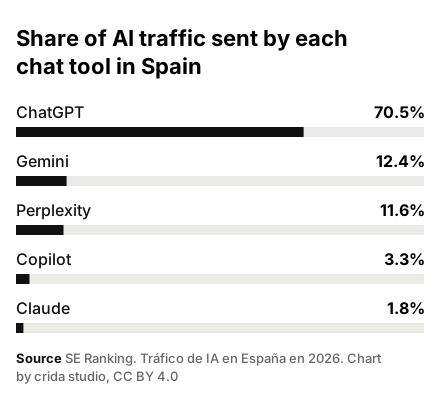
| Platform | Share |
|---|---|
| ChatGPT | 70.5% |
| Gemini | 12.4% |
| Perplexity | 11.6% |
| Copilot | 3.3% |
| Claude | 1.8% |
If I block AI bots, will I stop getting visits from ChatGPT?
It depends on the bot. OpenAI says that if you block OAI-SearchBot your site will not appear in ChatGPT search answers, although it can still show up as a navigational link. Blocking GPTBot only asks that your content is not used for training. To keep getting visits, OAI-SearchBot is the one not to block.
What to do tomorrow, especially if you see no AI traffic yet
If no AI visits show up at all, first check that you are not blocking the bots these tools use for search. OpenAI says sites that block OAI-SearchBot are not shown in ChatGPT search answers. Blocking GPTBot is a different matter, because it only asks that your content is not used to train models.
Then measure the same way every month and write it down. The numbers will stay small for a while, and what matters is the trend and which pages get the visits. If none of your service pages shows up anywhere, it may be time to check whether your site can be found and understood first.
At crida studio, our SEO work comes with a monthly report. Whoever prepares yours, it is worth putting these AI figures next to the calls and form submissions that come in. That way you can see whether visits from chat tools turn into work.
- Open the Traffic acquisition report and check the AI Assistant channel for the last 90 days.
- Create the custom channel group with the regex in this guide.
- Add landing page and note where AI visits arrive.
- Check your robots.txt and make sure OAI-SearchBot is not blocked.
- Look at the generative AI report as part of your monthly Search Console check.
- If you use Cloudflare, check each month which pages ChatGPT-User opens.
